How pods reach the internet: NAT and masquerading
The problem
Your namespace can reach other namespaces on the same host — you built that in the previous article. But try running curl https://api.github.com from inside one and you get nothing. The namespace is isolated. It has no path out.
This article explains exactly how that exit path works, from the Linux primitives up.
What you already have
From the previous article:
ns-blueandns-greenconnected throughbr0- Traffic between namespaces works
- Neither namespace can reach the internet
The bridge handles traffic between namespaces on the same host. To get traffic out — toward the internet — you need two more things: IP forwarding and NAT.
Step 1: IP forwarding
By default, Linux does not forward packets between network interfaces. It drops them. This is a security default — a machine that isn’t a router shouldn’t behave like one.
The setting that controls this:
1
2
# check current state — 0 means disabled
sysctl net.ipv4.ip_forward
To enable it:
1
2
3
4
5
6
7
8
9
10
# temporary — resets on reboot
sysctl -w net.ipv4.ip_forward=1

# permanent
echo 'net.ipv4.ip_forward = 1' >> /etc/sysctl.conf
sysctl -p

# verify
sysctl net.ipv4.ip_forward
# net.ipv4.ip_forward = 1
With forwarding enabled, the kernel will pass packets from br0 to eth0. But there’s still a problem: the packet leaving through eth0 carries the namespace’s private IP as its source address — 10.0.0.1. The internet has no idea how to route a response back to a private address. That’s where NAT comes in.
Step 2: NAT and MASQUERADE
NAT (Network Address Translation) rewrites the source IP of outbound packets so they appear to come from your host’s public IP. When the response arrives, NAT translates the destination IP back to the original private address and delivers it to the right namespace.
There are two ways to configure source NAT in iptables:
- MASQUERADE — uses whatever IP
eth0currently has. Ideal when your external IP is assigned by DHCP and can change. - SNAT — you specify a fixed source IP explicitly. Used when your external IP is static.
For most scenarios — and for how Kubernetes handles it — MASQUERADE is the right choice:
1
2
3
4
5
# apply MASQUERADE to all traffic leaving through eth0
iptables -t nat -A POSTROUTING -o eth0 -j MASQUERADE

# verify the rule is active
iptables -t nat -L POSTROUTING -n -v
What happens behind the scenes: conntrack
When a packet leaves through NAT, the kernel doesn’t just rewrite the source IP and forget it. It records the translation in the conntrack table — a kernel state table that maps:
1
private_ip:port  ↔  public_ip:port
When the response arrives from the internet, the kernel looks up that table, finds the original sender, rewrites the destination back to the private address, and delivers it to the right namespace.
1
2
3
4
5
# list active conntrack entries
conntrack -L

# filter for established connections only
conntrack -L | grep ESTABLISHED
Without conntrack, NAT would be one-way. Responses would arrive at the host with no record of where they belong.
The full picture
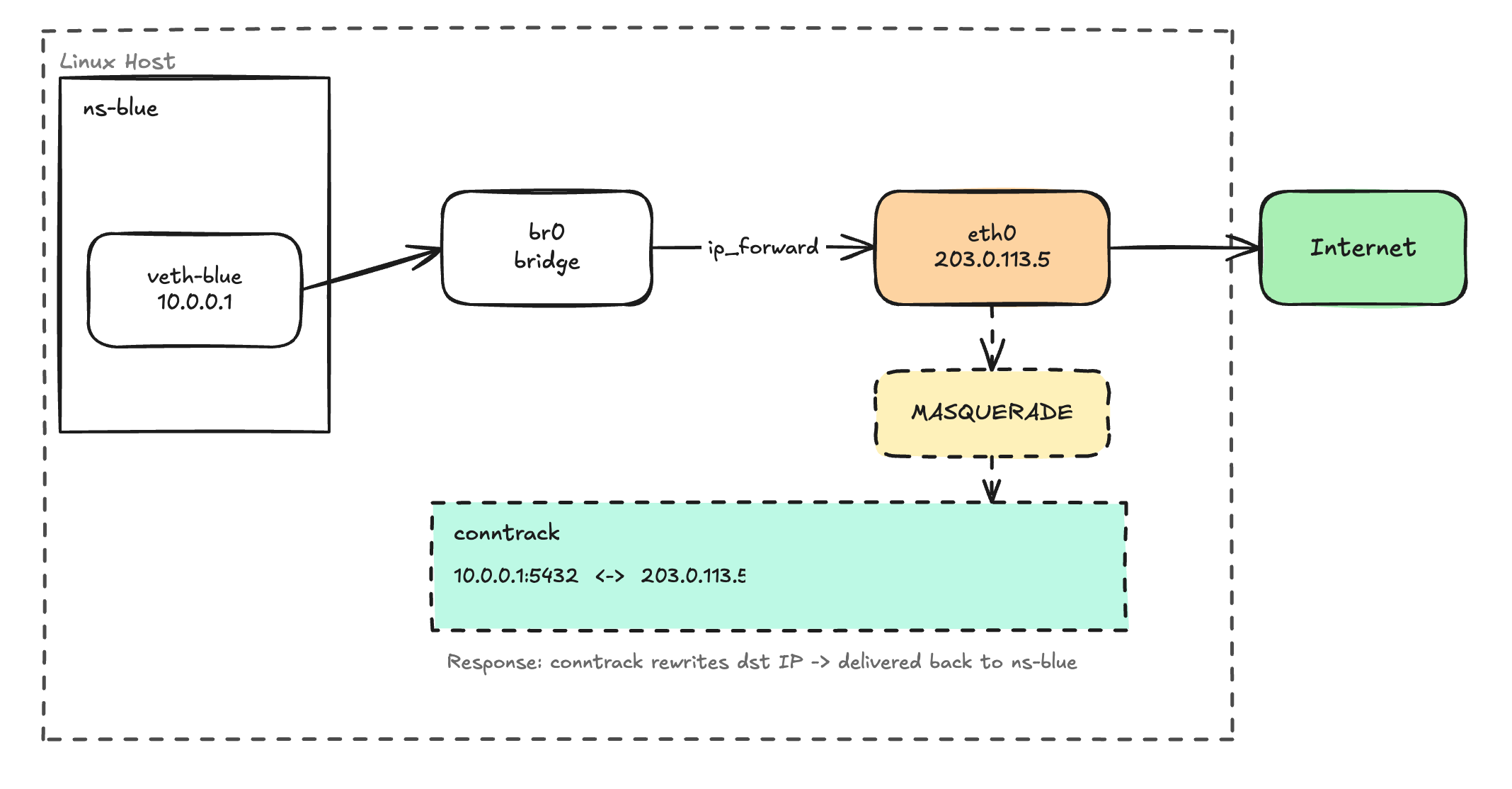
The path an outbound packet takes:
- Process inside
ns-bluesends a packet to8.8.8.8 - Packet travels through
veth-bluetobr0 - Kernel checks: is
ip_forwardenabled? Yes → forwards toeth0 - iptables POSTROUTING: MASQUERADE rewrites source IP to
eth0’s IP - Conntrack records the mapping:
10.0.0.1:5432 ↔ 203.0.113.5:443 - Packet leaves the host toward the internet
- Response arrives at
eth0with destination = host’s public IP - Conntrack matches it → rewrites destination back to
10.0.0.1 - Packet is delivered back to
ns-blue
This is exactly what Kubernetes does
When a pod sends traffic outside the cluster, the CNI plugin has already set up veth pairs and a bridge. ip_forward is enabled on the node. And there’s a MASQUERADE rule in the nat table rewriting the pod’s IP to the node’s IP before it hits the network — or the eBPF equivalent in Cilium.
Next time a pod can’t reach an external service, you have a checklist:
- Is
net.ipv4.ip_forwardenabled on the node? - Does the MASQUERADE rule exist in the
nattable? - Is conntrack tracking the connection?
Start there.